 Sojourner
Join the beta

The app, through one day
What Sojourner does
Sojourner: Habits & Training is an iPhone app, with an optional Apple Watch app, that turns the habits you choose, your training and your food into one daily score. It is free during the public beta on TestFlight, needs iOS 26 or later, and has no account: your records stay on your iPhone.
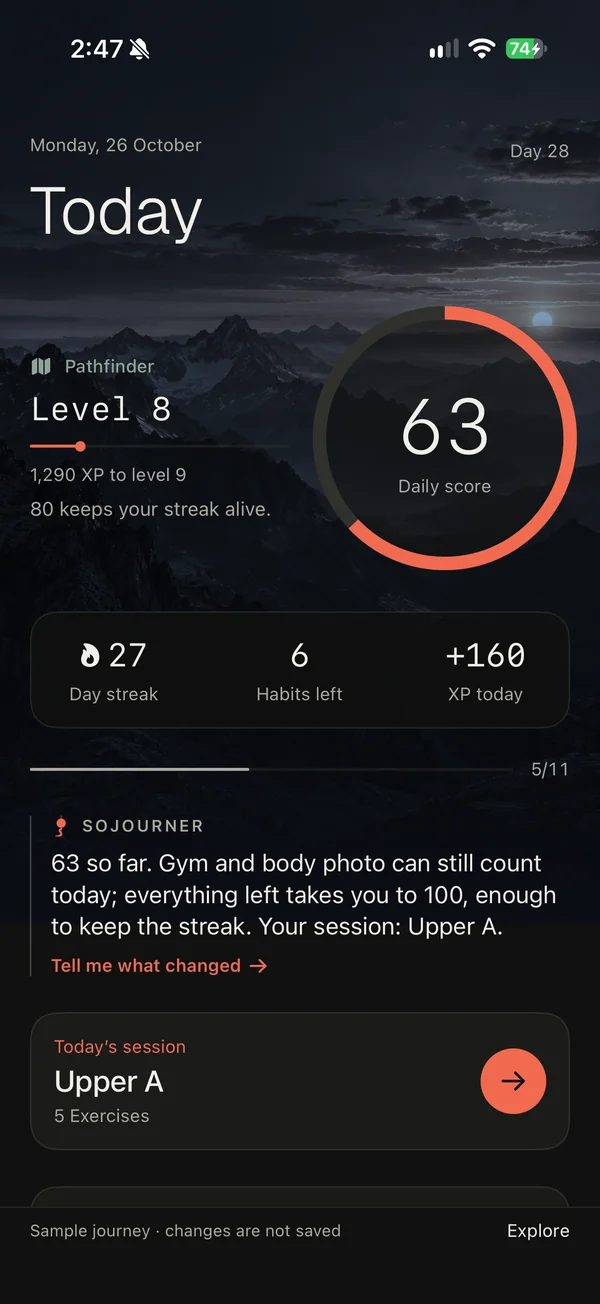
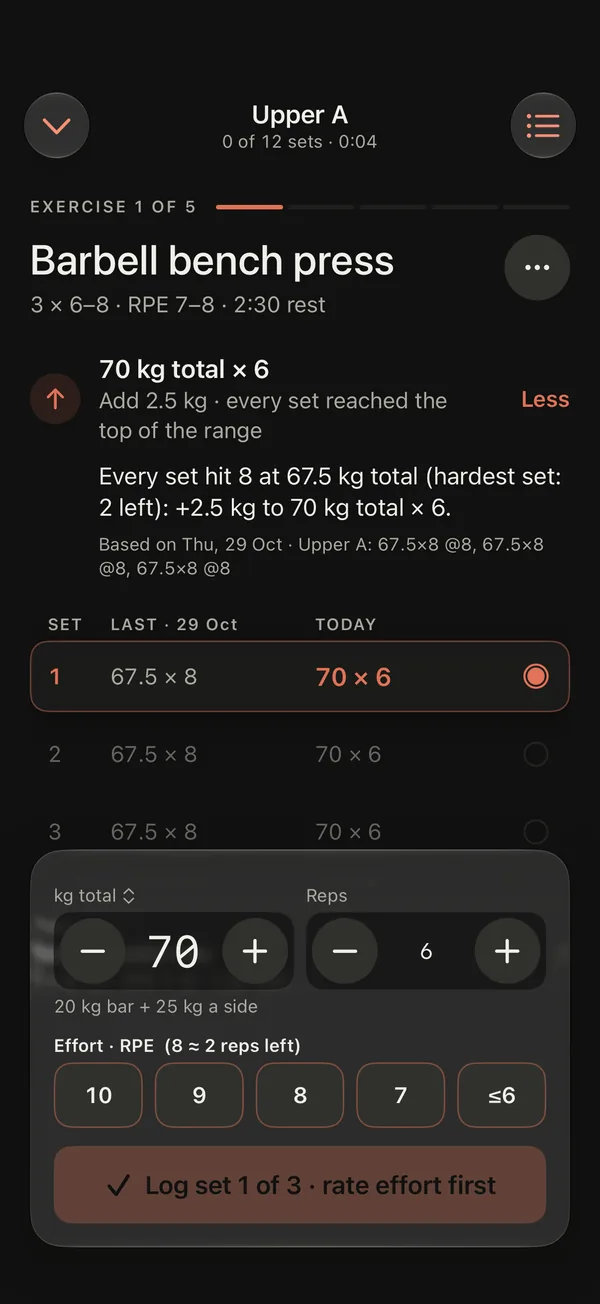
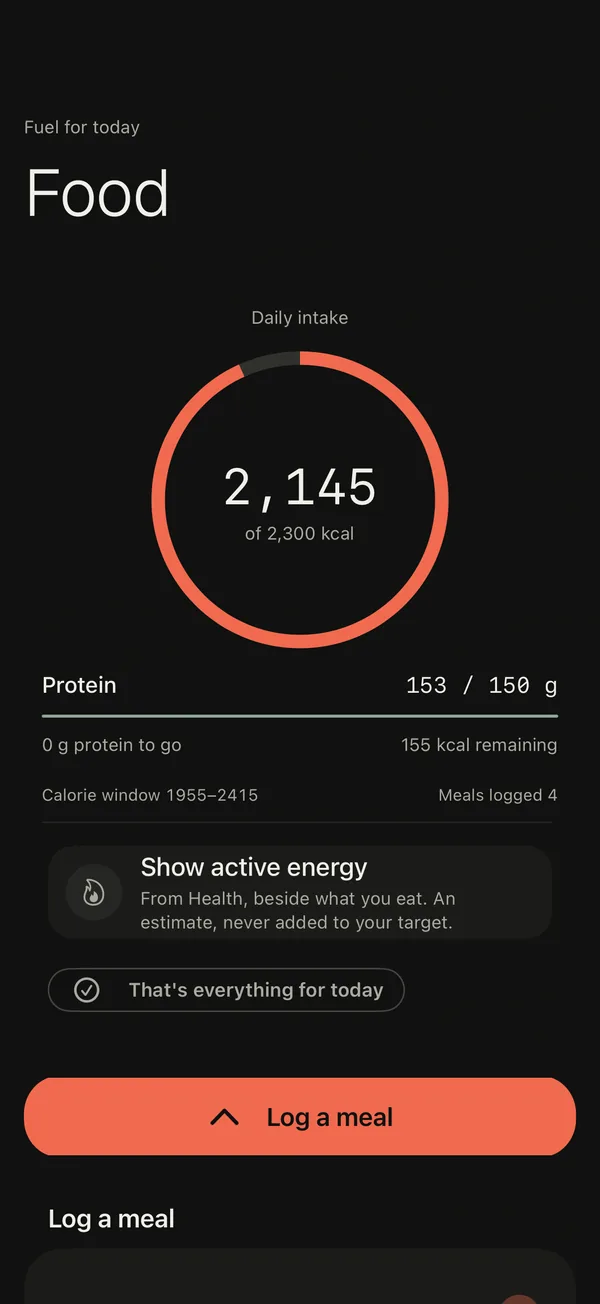
Actual app · sample journey
Most people don't need another app that tells them what to do. They need the day to hold together: the workout, the meals, the bedtime, and a way back after a bad week. Here is everything Sojourner does, in the order a day happens.
01
Today: one score from the day you chose
You pick the habits that count. Everything you do adds up to one score out of 100, and a day at 80 or more keeps your streak.
You choose the habits
Wake-up, morning light, weigh-in, body photo, gym, run, steps, calories, protein, water, phone down and sleep. The ones you don't pick don't count and don't remind you.
The basics weigh the most
Wake-up, gym, sleep and a planned run are worth the most; food and steps the least. So one basic can slip and the streak still holds.
80 keeps the streak
A good-enough day still counts, and one missed glass of water doesn't reset weeks of work. Why that works.
The one thing next
Today shows what matters now, and finished habits fold into a single line.
Today so far
Each line says whether it's recorded, an estimate, not known yet, or only the plan.
No Watch? Type it in
Light, sleep, steps or training time, marked as self-reported.
Water in one tap
+250 ml, with +500 ml and undo close by.
Your session, ready
On a gym day, Today shows the session with a Start button.
The last seven days
Seven squares, and this week's average weight against last week's.
02
Morning: get up, go outside
Get up. Go outside. Prove it.
The wake-up habit is a real alarm, and that's its message. It rings through silent mode, then every 5 minutes for half an hour, until a photo you take outdoors is checked on your iPhone.
Hear it first
"Test alarm in 1 minute" lets you hear it before you rely on it.
Early counts
Prove you're up any time, even before the alarm: full credit until 15 minutes after it, fading over two hours.
One later morning a week
Move tomorrow's alarm later once, with a reason. Moving it earlier is always free.
Morning light
Ten minutes or more of daylight before noon, from Apple Health's time in daylight, or typed in.
Weigh-in
A morning weigh-in, or your smart scale's reading from Apple Health.
Body photo
One a day, with a faint copy of the last one to match the pose, and a self-timer.
03
Your plan: chosen by you, editable by you
Ten 8-week starting plans
Strength foundations, bodyweight, full body, push/pull/legs, home dumbbells, upper/lower, two hybrids with runs, a bro split, and push/pull/legs twice a week.
Plans as cards
Each starting plan shows who it suits, its training days across the week, how long a session takes and the equipment it needs.
Find your starting point
Pick a goal, how many days you train and your equipment, and get two suggested plans.
Bring your history
Import your past workouts from a Hevy or Strong CSV export. A preview matches each exercise to the library first; then last time, records, charts and suggested weights start from them. Imported workouts never score a day or go to Apple Health.
Bring your own program
Paste a coach's message, a ChatGPT plan or rows from a spreadsheet, or choose a file: Excel, CSV, PDF, Word, text, images or screenshots. You review it before it replaces anything.
Edit anything
Days, exercises, sets, reps, rest and weight steps, and set each stretch of weeks to Build, Hold or Easy.
Train your way
"Guide me", "Just log" or "Follow my program"; effort as reps left or RPE; your places and the equipment at each.
366 exercises, 871 guides
Build plans from 366 exercises. The 871 exercise guides work offline: 868 have demonstration photos and 37 have short videos.
A picture beside every exercise
Lists show a still of the mannequin from the exercise's film where there is one, or a body map with its muscles lit.
04
In the gym: the next weight, and why
Every set comes with a suggested weight and the reason. Reps go up first; once every working set reaches the top of the range at the planned effort, the weight goes up by that exercise's own step. It only comes down when a weight fails the range. That's double progression, and you can try the same rule on the web.
Warm-ups that don't count
A warm-up page, then ramp-up sets toward your working weight on heavy lifts.
Last time, beside this time
Each set sits next to the same set last session; tap a logged set to fix it.
Effort in plain words
After a set: how many more could you have done? RPE is there if you prefer it.
A guided first set
Your first workout shows three short tips on how to log a set, once.
Drop sets, to failure, left and right
Add a drop set after a working set: it counts toward the week's sets, never toward progression or records. A set with no reps left is marked to failure. One-sided exercises take left and right reps, and the weaker side counts.
The whole session at a glance
The Exercises sheet shows every exercise's sets: correct any set or log the next one there. "Add a set" changes today's session only.
Undo
For a few seconds after you log a set, Undo takes it back, with the rest it started.
History mid-rest
The exercise sheet has How to do it, History and Progress, so your last sessions of that lift are there without leaving the workout.
A rest timer
It starts after each set and counts down on the Lock Screen too: +30 s or skip.
Pounds or kilograms
Chosen per lift, with plates per side.
Swap or skip, just for today
Alternatives for the same muscle and the same movement are suggested, and your plan stays as written. Add exercises, or timed work like planks, as you go.
Easy weeks
They keep the weight and drop to the bottom of the range.
Every set kept
A summary with records and "Since last time" after each workout, and a chart and estimated one-rep max for every lift.
Share this workout
From the summary, a picture of the session to send: its muscle map, time, sets, top set and records.
Sets per muscle
This week's sets on a front and back body map, shaded by sets, with a ring on any muscle under 10. Tap one for its lifts.
Save to Apple Health, if you want
Choose it once and each workout you finish in gym mode is saved to Health as Strength Training, with the measurements you type. Off by default.
05
When the week goes sideways
Plans meet real weeks. The job is to keep a bad day from becoming a bad month.
Missed a session?
Train shows the ways back, best first: fit it into an open day, swap a lighter one, shift the week, or carry on. Nothing changes until you choose. More on that.
Or pick a day
Any open day before the session comes round again. A moved session stays owed, and your streak shows "On credit" until you do it.
"Can't train today?"
It shows what skipping would cost first, then where the session can go.
Only 30 minutes?
"Main lifts only" or "Easy session today".
Back after a break
After 14 days without a workout, it offers an easy week back instead of making up what you missed. Back to the gym.
Tell Sojourner
"I missed the gym yesterday", "I only have 30 minutes", "move Upper B to Friday". It proposes, you confirm. Missed and short days work on any iPhone; free-form plan changes need Apple Intelligence.
Every change listed
Each one shows under your plan, with "Back to the plan as written".
Days off
Weekends and holidays: no alarm, morning light counts half, and phone-down an hour later the night before.
A debrief after a hard day
After a day under 80, you write what happened, and it's kept with your week.
06
Food: calories and protein, the way you eat
Targets from your weight and goal
Starting calories and protein that you can edit.
Describe a meal in words
"2 rotis, a bowl of dal": foods and amounts are split by rules, and the numbers come from the food table. No AI needed.
Portions the way you say them
A katori, a bowl, a plate, 2 rotis. When it's unsure, calories are counted generously and protein conservatively.
Check before saving
Each item shows the food it matched and its grams. Change them, or keep a portion for next time.
6,222 foods offline
USDA data and Indian packaged foods: set the amount and the numbers follow.
Barcodes and labels
Scan a barcode (product data from Open Food Facts, open data under the ODbL); a product scanned once works offline after that. Not found? Photograph the nutrition label: only printed values are used.
Your regulars and recipes
Recent meals and saved recipes are one tap away.
Unknown stays unknown
Missing protein is marked unknown, a meal you didn't log never counts as zero, and on a low day Sojourner asks whether meals are missing.
A weekly check-in
For weight-loss goals, it can adjust calories from your 7-day average weight. How it decides.
What should I eat next?
High-protein ideas that fit what's left, on iPhones with Apple Intelligence.
07
Evening: phone down
Phone down
Check in by bedtime. It counts from three hours before, so an early night is never a miss.
The night screen
Open the app after bedtime and it shows how late it is and when the alarm rings, with "Phone down. I'm going to sleep."
A bedtime ladder
Start from when you really sleep. Every 2–4 days, bed and alarm move 15, 20 or 30 minutes earlier, once you were up on time on that step's mornings. Plan yours.
Sleep counts your main night
Naps never count.
08
The long view
One square for every day
Your rhythm is visible at a glance, and each habit over the last 30 days.
Weight trend and photos
A smoothed weight trend, and progress photos with a pose-matching overlay.
XP, levels and ranks
Nine ranks from Drifter to Legend, 26 badges, and the road ahead.
Your weeks, kept
Every weekly check-in and debrief in one place, with a review of your week on iPhones with Apple Intelligence.
Body measurements
Waist, body fat and lean mass beside your weight, each with the change and a trend. Readings from a smart scale or another app in Apple Health show there too.
What Sojourner remembers
Notes you choose to keep, and your recent patterns.
09
On your wrist and your Lock Screen
Today on the Lock Screen
Your score, streak and what's next, with a countdown, on the Lock Screen and in the Dynamic Island.
Back to your workout in one tap
While a workout is open, a pill with its time or your rest countdown stays above every page (in the Classic look, on iOS 26.1 or later).
A training calendar widget
This month's done, missed and planned days and your next session, on the Home Screen or the Lock Screen.
Rest and next, from the Lock Screen
During a workout the Lock Screen shows the exercise, the set and your rest. Turn on "Log sets from the Lock Screen" in Settings and it also offers Skip rest and Next exercise.
Today on the Watch
The score ring, habits done, the streak, minutes outside and what's next.
Train from the Watch alone
Weight on the Digital Crown, plates per side, reps and reps left, a full-screen rest with +30 s and skip, and the exercise list. Suggestions come from the phone.
Watch time counts
A Watch workout's time counts toward your gym habit.
10
Make it yours
Your reason, kept
At the start you write why you're doing this; on hard days Sojourner quotes it back.
Your rules
Set your own targets for sleep, light, workout length, gym time, steps, calories, protein and water.
Rules hold for the day
Changes start tomorrow, and making a rule easier means typing it out. Making one stricter is free.
Three looks
Ink · Mineral · Vermilion, Obsidian · Electric Citron, and Midnight · Glacial Blue, carried to the Watch.
Choose its voice
Gentle, Firm or Relentless, for the lines Sojourner writes on iPhones with Apple Intelligence.
Celebrations
Confetti, a tap and XP when you finish things.
Look around first
Explore a sample journey before you start; it's separate from your records and never saved.
11
Private by design
No account
Nothing to sign up for; there is no Sojourner server holding your records.
Stored on your iPhone
Your workout, meal, habit and weight records and photos. Export everything as one backup file whenever you like.
No ads, no analytics SDKs
The app's App Store privacy label says Data Not Collected.
AI on the iPhone
Features that use AI run on the device, with Apple's models.
Health is optional
Health, the camera, notifications and location are each optional. From Health it reads what you allow (workouts, sleep, steps, weight, time in daylight, heart rate, resting heart rate, running distance and routes, active energy if you ask from Food, and waist, body fat and lean mass when you open Measurements). The iPhone app writes to Health only after you choose Save to Apple Health: then each workout you finish in gym mode is saved as Strength Training, with an energy estimate only when your Apple Watch didn't measure it, and never as a second copy of a workout your Watch or another app recorded, plus the waist, body fat and lean mass you type. Turn it off in Settings → Alarms & connections.
It tells you what leaves
A Privacy & sources page in Settings says exactly what can leave the phone and lists the data sources.
What having no account means, and how other apps' labels compare: a habit, gym and food app with no account, and the labels of the 153 top fitness apps. The full detail is in the app privacy policy.
12
What you need
| Phone | iPhone with iOS 26 or later |
| Watch | Optional; the Watch app comes with the iPhone beta |
| Price | Free during the beta |
| Account | None |
| Android | In development; join the waitlist |
13
What Sojourner isn't
It isn't a medical device and doesn't diagnose, treat or promise any health or weight outcome. Its suggestions are rules you can read, applied to what you logged; talk to a professional before big changes to diet, training or sleep. It is also a beta: builds expire after 90 days on TestFlight, so keep updates on. Some newer parts of the current build are still being checked on real phones, and they'll appear here once they are.
Sojourner: Habits & Training
Try the whole thing, free, on your iPhone.
The public beta runs on Apple's TestFlight. No account to make: no email, no password. Set it up once, and your records stay on your iPhone.
TestFlight public beta · iOS 26 or later · Android in development